Overview
Role-Based Access Control (RBAC) in the RUX Shop lets you self-manage who in your organization can access your Storefront and what each person is able to do. There are two types of users:
- Admin user — can create new users for your organization and assign one or more roles to each user.
- Simple user — has access only to a specific set of Storefront features, based on their work needs and eligibility.
To get started, your primary account contact can manage your organization's users at shop.ruxsoftware.com/my-account/?mode=storefrontusers.
User types & roles
Admin user
Has full rights for managing users.
Simple user
Has a range of restricted access rights that depend on the role(s) assigned to them. Each Storefront user can hold one or more of the following five roles, each configurable in terms of access rights and permissions:
| Role | What they can do |
|---|---|
| Billing Agent | Manages billing details and makes payments. |
| Subscriptions Manager | Manages subscriptions (adding extra licenses, purchasing add-ons, etc.). Cannot place an order for a new product. |
| Buyer | Places new orders and requests trials. |
| Cloud Administrator | Manages the services in the My Workspace section. |
| My Storefront Manager | A special role available only to resellers upgraded to the Standard Edition. Allows access to the administration section of the Standard Reseller's Storefront. |
Example
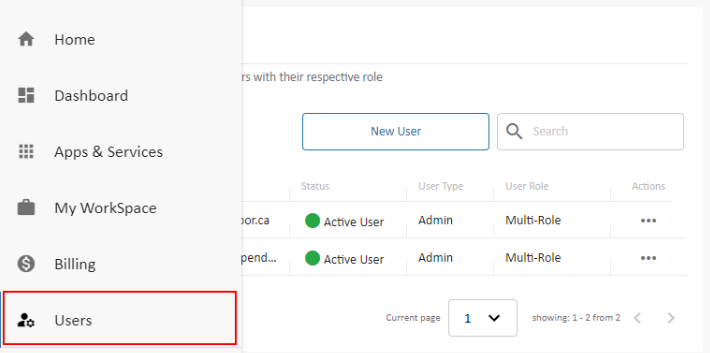
From the Users area, you can see everyone in your organization with their status, user type, and assigned role, and add new people with New User.
Need help?
If you have questions about setting up users or roles, please reach out to your RUX Software contact and we'll be glad to assist.
Was this article helpful?
That’s Great!
Thank you for your feedback
Sorry! We couldn't be helpful
Thank you for your feedback
Feedback sent
We appreciate your effort and will try to fix the article