Overview
You can add a new credit card or update an existing one for your software subscriptions at any time from the My Account area of the RUX Shop. This article shows you how.
Step 1: Sign in to the RUX Shop
Go to https://shop.ruxsoftware.com and log in to your account.
Step 2: Open My Account
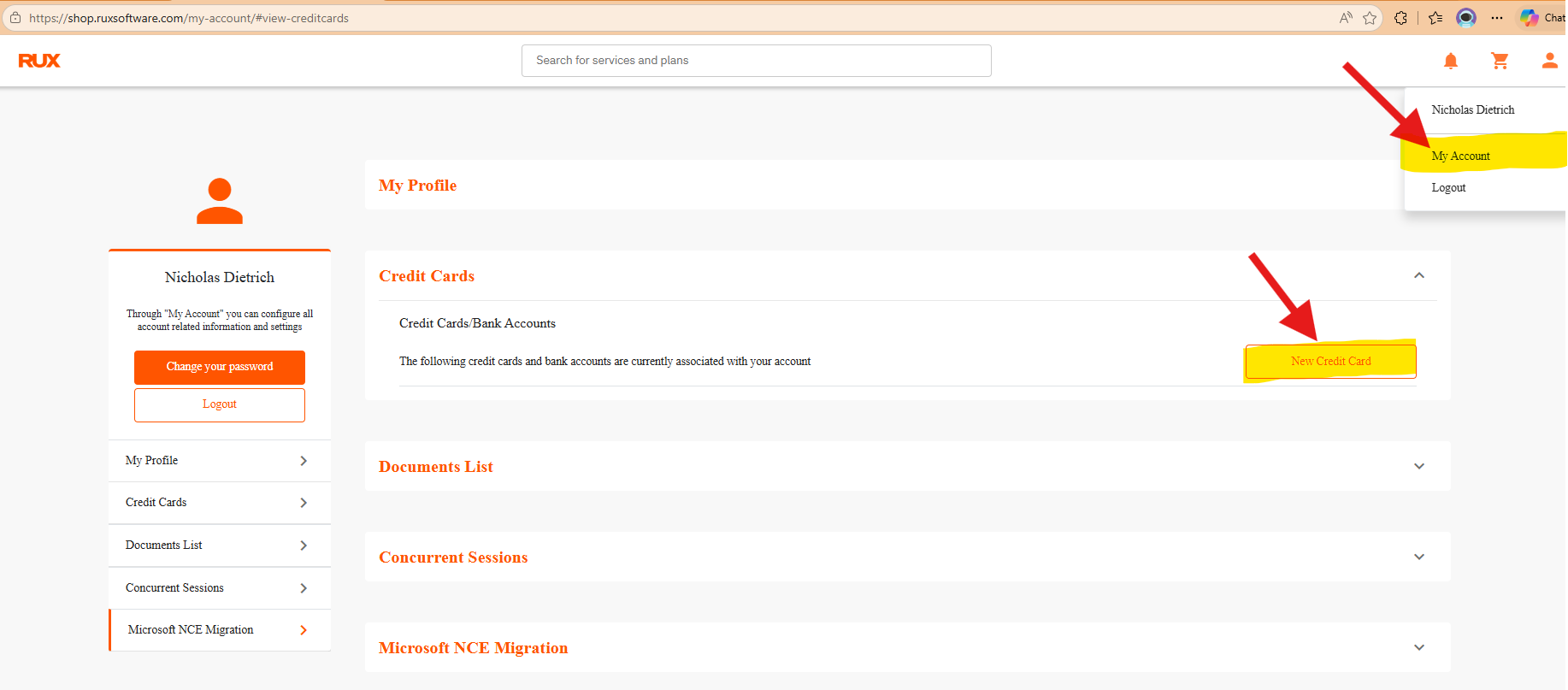
Click the account icon in the top-right corner and select My Account.
Step 3: Open Credit Cards
From the left-hand menu, select Credit Cards. To add a card, click New Credit Card; to update one, edit the existing card. You can also go directly to shop.ruxsoftware.com/my-account/#view-creditcards.
Please note: Cards with historical transactions can't be deleted. If you no longer wish to use a card, please ask your account manager for assistance — we can deactivate it internally and remove it from your list.
Need help?
If you have any questions about your payment methods, please reach out to your RUX Software contact and we'll be glad to assist.
Was this article helpful?
That’s Great!
Thank you for your feedback
Sorry! We couldn't be helpful
Thank you for your feedback
Feedback sent
We appreciate your effort and will try to fix the article